Hey there, let’s cut through the noise today because one question I get asked at least a dozen times a day by network engineers, datacenter ops guys, and even those new to MPO/MTP deployments is: Do I actually need to match my MPO/MTP cable length to my setup? Spoiler alert: It’s not a straight yes/no, but a “it depends—and get this, getting it wrong can cost you way more than you think.” I sell multimode MPO/MTP cables (that’s my bread and butter, full transparency), so I’ve seen every mistake in the book here, from a 2022 datacenter refresh that had to re-terminate 5000 feet of extra cable at 2 a.m. to a small office that skipped length matching and dropped their connection mid-presentation. Let’s break this down like we’re geeking out over our favorite network gear (no stuffy textbook jargon, promise). MPO/MTP Multimode Fiber Cable
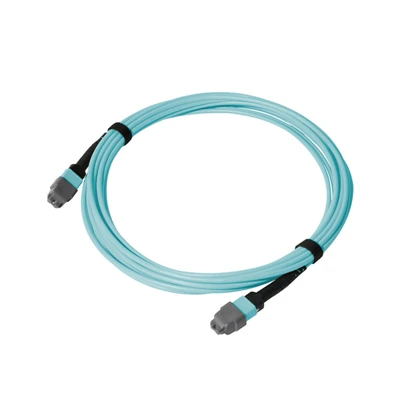
First, let’s ground this in what MPO/MTP cables are, for the new folks. They’re the fat, multi-fiber cables that carry 12, 24, or even 72 fibers at once—think of them as the highway system for your datacenter, server rack, or high-density network setup. MTP is just a brand name for a specific type of MPO connector, so I use them interchangeably a lot. These cables connect things like top-of-rack (TOR) switches to patch panels, or patch panels to core switches, right? So their length is basically how far that fiber highway stretches between two points.
Now, back to the big question. Let’s start with the cases where length matching does matter. The biggest one is when you’re dealing with active equipment that’s calibrated for specific link lengths. Most modern TOR switches and core transceivers (like QSFP28, OSFP, or even the older CFP2) are tuned to work best when the cable run between them is within a certain range. Why? Because fiber signal degrades over distance—signals stretch, attenuate, and can cause errors if they have to travel way further or shorter than intended. For multimode specifically, that’s even trickier because of mode delay distortion (MDI)—oh, right, the thing where different light signals travel at slightly different speeds, and the longer the run, the more they overlap, causing a mess. If your transceiver is set for a 5-meter run and you slap a 15-meter cable on it, you might get “link instability”—dropped connections, slow speeds, error counts spiking that make your NOC team pull their hair out at 3 a.m.
Wait, but what’s “length matching” exactly? It doesn’t mean every single cable has to be exactly the same length down to the inch. That’s a myth I hear all the time. For example, if you have a 48-port TOR switch, you don’t need all 48 MPO cables to be 7.2 feet flat—within 10-15% of your target length is totally fine. The problem comes when there’s a huge discrepancy. Like, if one cable runs 2 feet and the next runs 30 feet in the same rack setup, that’s when the uneven path lengths mess with signal timing, especially for parallel optics (which are super common in MPO/MTP setups). Parallel optics send multiple signals at once over separate fibers, so uneven lengths throw off the alignment of those signals, leading to what’s called “skew” that kills performance.
Then there’s another scenario where length matters a lot: when you’re doing breakout cables. A lot of folks take a 12-fiber MPO cable and break it out to four 3-fiber LC cables for server connections. If the main MPO run is way longer or shorter than the breakout cable’s length, you get that same skew issue—those individual fibers have to travel different distances, so their signals don’t line up. I once had a customer build a small server cluster using breakout cables, and they ran into 10% packet loss until we adjusted the MPO cable lengths to within 8% of each other. That’s the difference between a smooth deployment and a week of debugging.
But wait, don’t go thinking length matching is always required—because it’s not. Let’s talk about the cases where you can ignore it, no problem. First, if it’s a temporary setup. Let’s say you’re doing a pop-up event, or a temporary lab test, or a quick fix for a broken cable. If you’re not running this setup long-term, and you’re not using high-speed transceivers (like 10G, 25G, even 100G—wait, no, 100G is getting tight, let’s say 1G or small 10G), then you can get away with mismatched lengths. I’ve sent 500 feet of extra cable to a customer who just needed a quick fix for a conference, and they had it coiled neatly (not kinked, important!) and it worked fine for the two-day event. But don’t make a habit of that—permanent setups are where the long-term risks kick in.
Another case where length doesn’t matter? If your setup uses passive optical splitters that are designed to accommodate varying lengths, or if you’re using multimode MPO cables for low-speed, short-distance vertical runs (like between a patch panel and a switch in the same rack, where runs are usually 3-10 feet). I’ve had customers run 5-foot and 8-foot MPO cables side by side in a single rack for 3 years, no issues at all, because the short distances mean minimal signal degradation. It’s only when you’re running longer runs (over 30 feet, generally) or high-speed setups (200G, 400G, 800G) that length matching becomes a must.
Wait, let’s clear up another common myth: “Longer cables are always worse.” No, not always. If your transceiver is rated for up to 100 meters, a 50-meter cable is totally fine—shorter than the max, but not so short that you get skew. It’s not about being “too long” or “too short” as much as being outside the transceiver’s calibrated range and having major length discrepancies between parallel fibers. I’ve seen a customer use a 20-meter cable when they needed 10 meters, and it worked perfectly because the transceiver was rated for that range. The mistake came when another part of their setup had a 1-meter cable next to that 20-meter one—total skew nightmare.
So what’s the practical advice here? Let’s keep it simple, no fancy formulas. First, before you buy any MPO/MTP cables, check your transceiver specs. Look for the “maximum recommended link length” and “ideal path length tolerance.” That’s your baseline. Second, map out your setup first—measure exactly how far each cable needs to run between devices, leaving a little extra (like 1-2 feet) for slack, but don’t go overboard. If you need slack, bundle it neatly or use a cable manager—coiling 10 feet of cable into a 6-inch circle is a bad idea (it can cause microbends that kill signal way faster than length issues). Third, if you’re doing parallel optics (which is most MPO setups for high speed), keep all cables within 10% of each other’s length. That’s the sweet spot where skew is minimal and signal is clean.
Now, as a multimode MPO/MTP cable supplier, let me tell you what I recommend to all my customers. If it’s a permanent, high-speed (100G+) deployment—match lengths within that 10% range. If it’s temporary, low-speed, or short-distance (<20 feet) setup? You can fudge it a little, but don’t make a habit of it. I’ve had customers who skipped this for a small office refresh, and six months later they’re calling me because their 10G switches are dropping connections weekly. The fix? We swapped out the mismatched cables for ones within 8% of each other’s length, and boom—fixed. No more dropped calls, no more NOC headaches.
Wait, one more thing about multimode vs single mode—hold on, I’m a multimode specialist, but this is relevant. Multimode is way more sensitive to length and skew than single mode, right? Because single mode uses one light signal, so no mode delay distortion. So if you’re working with multimode MPO cables (which is what I sell), length matching is even more important than if you were using single mode. That’s a key point I don’t want you to miss. I’ve had single mode customers ask about this, and they get away with more flexibility, but multimode? Not so much.
Let’s also talk about cable quality, because that ties into length too. A cheap MPO cable with tight bends or bad connectors will have issues regardless of length, but even the best cable in the world will have signal issues if it’s way outside the transceiver’s range. So don’t skip buying good cables just to save a buck, but also don’t buy way longer than you need just in case—That’s wasted money, and extra cable takes up space in your rack.
What about patch panels? Do the lengths between patch panels matter more than between switches? Not really. Same rule applies—if you’re running parallel fibers, keep lengths close. I’ve seen a 1000-square-foot datacenter where they had MPO runs from patch panel 1 to TOR, patch panel 1 to core, and patch panel 2 to core. They accidentally ran a 50-foot cable on patch panel 2 to core and a 15-foot cable on patch panel 1 to core, and their core switch was throwing errors. It took them a week to realize it was the length mismatch, not a bad connector. That’s the kind of headache you can avoid with a little planning.
So to wrap this up—do you need to match MPO/MTP cable length to your setup? The short answer is: for permanent, high-speed multimode setups, yes. For temporary, low-speed short-distance setups, no, but be mindful of discrepancies. Don’t buy into the myth that every cable has to be exactly the same length, but don’t ignore big gaps either. Check your transceiver specs, map your runs first, keep parallel cables within 10% of each other, and use good cables that don’t have microbends.

If you’re planning a new MPO/MTP deployment, or you’re dealing with persistent issues from length mismatched cables, hit me up to chat through your setup. I can help you figure out the right lengths, recommend the best multimode MTP cables for your needs, and make sure you don’t end up pulling all-nighters debugging signal issues. No pressure, just straight talk about network gear that actually works.
ADSS Fiber Optic Cable Hardware Reference:
- Fiber Optic Association. "Multimode Fiber Optic Link Design and Installation." FOA Online Library, 2023.
- Cisco Systems. "MPO/MTP Cable Best Practices for High-Speed Ethernet Deployments." Cisco Tech Notes, 2022.
- Corning Incorporated. "Signal Attenuation and Skew in Multimode Parallel Optics Systems." Corning Fiber Solutions Guide, 2021.
Shenzhen Dimi Telecommunications Co., Ltd.
As one of the most professional MPO/MTP multimode fiber cable manufacturers and suppliers in China, our products have good reputation in the market. Please rest assured to wholesale advanced MPO/MTP multimode fiber cable made in China here from our factory. Also, custom service is available.
Address: China
E-mail: sales@dimifiber.com
WebSite: https://www.dimi-fiber.com/
